
Changing the dictation language in Dictation Pro on Windows 10
-
I have downloaded Dictation Pro from the Microsoft Store. I want to create documents in the Spanish language. But I don’t know how to add that language on my computer. Help would be appreciated.
-
You can easily dictate in the Spanish language with Dictation Pro. This speech recognition software allows you to dictate in multiple languages.
To dictate in Spanish, the language should be installed on your computer. To install the Spanish language on your PC, select the Start button, then select Settings > Time & Language > Region & Language.
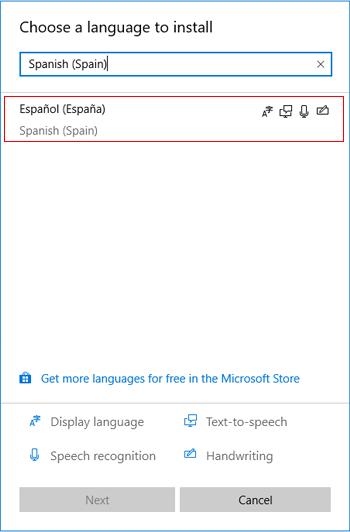
Next, select Add a language and you will be shown all the languages that Windows 10 currently supports. Choose the language as ‘Spanish (Spain)’.
[img=https://www.deskshare.com/forums/images/posts/DPpost6200.png]Change your language in Windows[/img]
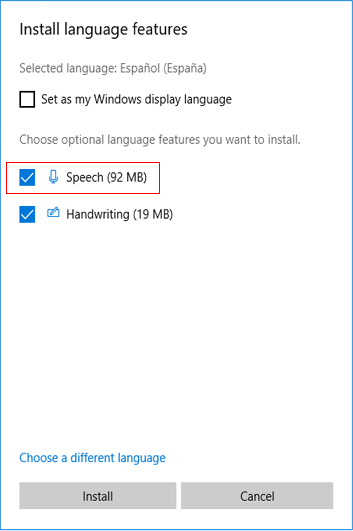
Click 'Next’ and make sure that the Speech option checkbox is selected. Then click ‘Install’ to start downloading the Language Pack and Speech.
[img=https://www.deskshare.com/forums/images/posts/DPpost6200-1.png]Download Windows 10 Language & Speech Pack[/img]
Once the language is installed on your PC, open Dictation Pro and go to Menu >> Settings. Select the dictation language as ‘Spanish (Spain)’ and save the settings. Then click ‘Start Dictation’ to create your documents speaking Spanish.
Hello! It looks like you're interested in this conversation, but you don't have an account yet.
Getting fed up of having to scroll through the same posts each visit? When you register for an account, you'll always come back to exactly where you were before, and choose to be notified of new replies (either via email, or push notification). You'll also be able to save bookmarks and upvote posts to show your appreciation to other community members.
With your input, this post could be even better 💗
Register Login