
Transfer files between PC and Android mobile device using Auto FTP Manager
-
I am using Auto FTP Manager to upload files to my FTP server. I like the way it works. Now I want to transfer files from my computer to mobile device without using a USB cable. How to do this? I need help.
-
You can transfer files between your PC and android devices using Auto FTP Manager with Android application- PC To Mobile Transfer.
First, install PC To Mobile Transfer on your Android device. Download this FREE application from the Google Play Store.
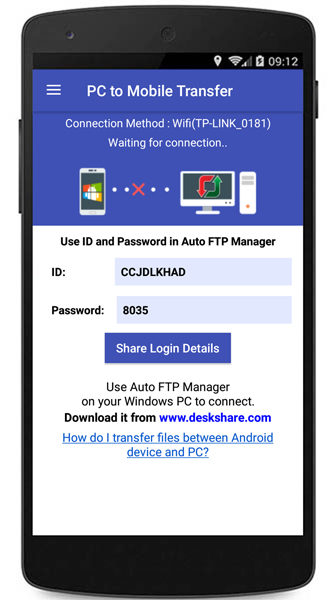
To transfer files between your PC and mobile device, open the PC to Mobile Transfer app on your device, note down the ID and Password to use in Auto FTP Manager.
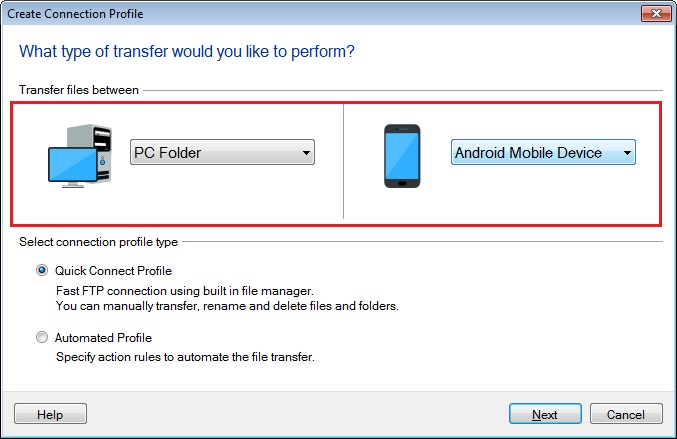
Then open Auto FTP Manager, go to File >> New Connection Profile. Create a connection profile to transfer files between your PC and your mobile device.
Now go to the next page, enter the mobile connection details and create the connection profile.
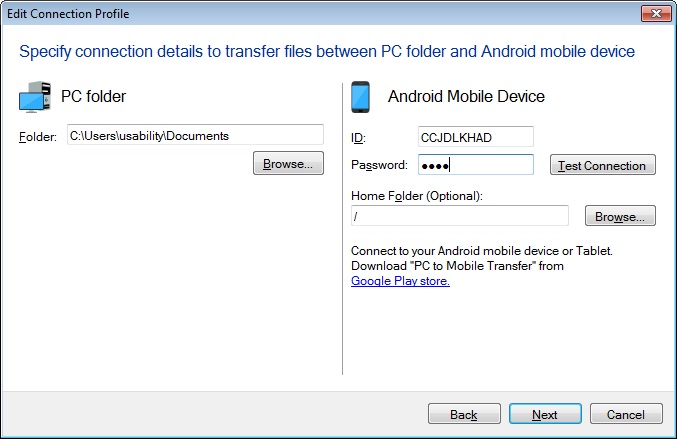
This way you can easily move your files between your PC and Android mobile device.
Hello! It looks like you're interested in this conversation, but you don't have an account yet.
Getting fed up of having to scroll through the same posts each visit? When you register for an account, you'll always come back to exactly where you were before, and choose to be notified of new replies (either via email, or push notification). You'll also be able to save bookmarks and upvote posts to show your appreciation to other community members.
With your input, this post could be even better 💗
Register Login