
Select the application language in Text Speaker
-
I am learning the French language so I just bought Text Speaker with the voice of Céline in French. When I try to use the application, it opens in English, but not in French. What can I do to use it in French?
-
You can change the language in which the application interface is displayed in Text Speaker. When the language is changed, the Menus, Dialog boxes and Window titles will be displayed in the selected language.
To change the language of the application, click Tools >> Settings. Then select the program language as French from the Language dropdown. Click Ok to save the settings.
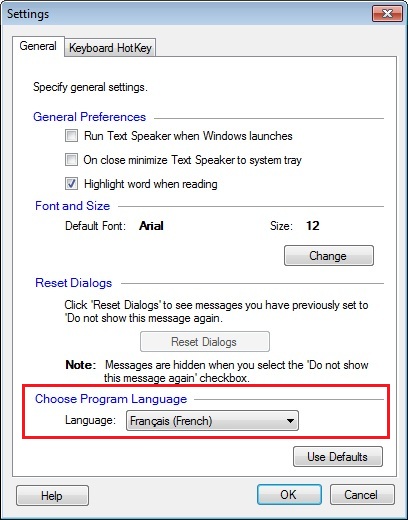
Now, when you launch the application it will open in French.
Hello! It looks like you're interested in this conversation, but you don't have an account yet.
Getting fed up of having to scroll through the same posts each visit? When you register for an account, you'll always come back to exactly where you were before, and choose to be notified of new replies (either via email, or push notification). You'll also be able to save bookmarks and upvote posts to show your appreciation to other community members.
With your input, this post could be even better 💗
Register Login