
Add background music during text to speech conversion
-
Can I add background music during text to speech conversion? I want to add a WAV music in the background.
-
You can add background music in Text Speaker while converting the text file to MP3 audio. The file formats supported for background music are MP3, WAV, AVI, WMA, MPA, ASF, MPEG, MPG, and M1V.
Open your document in Text Speaker. Click Speak >> Convert Current File to Audio. On the Audio Properties dialog, look for the Background Music section and select the Add background music to output file checkbox. Click the Browse button to choose the WAV music file that you want to add. Click OK to start conversion.
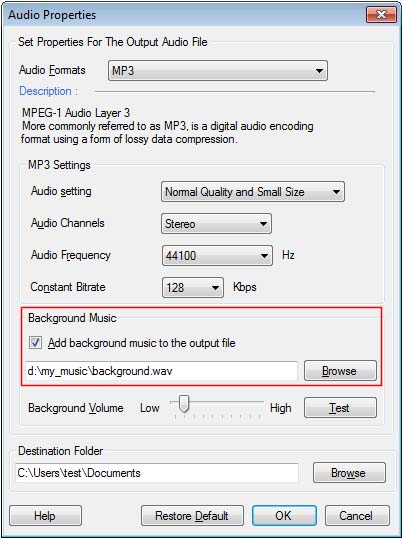
The file will be converted to MP3 audio format with your selected WAV file background music.
Hello! It looks like you're interested in this conversation, but you don't have an account yet.
Getting fed up of having to scroll through the same posts each visit? When you register for an account, you'll always come back to exactly where you were before, and choose to be notified of new replies (either via email, or push notification). You'll also be able to save bookmarks and upvote posts to show your appreciation to other community members.
With your input, this post could be even better 💗
Register Login