
Start broadcasting the camera video every evening
-
I would like to watch my cameras live for 30 minutes in the evening. Is it possible to broadcast the camera feeds from Security Monitor Pro every day at 7PM for half an hour and then stop the broadcast? I don't want it running all the time.
-
The Scheduler in Security Monitor Pro allows you start broadcasting, recording or monitoring automatically at specified time. You can use the daily schedule to run these actions every day.
To add a schedule, click Tools >> Scheduler. On the Add Schedule dialog, select the Broadcasting action and a Daily schedule type. Select the start date and enter the start time as 19:00. Make sure to enter the time in 24 hour format. Keep the Run for duration as 30 minutes and click OK.
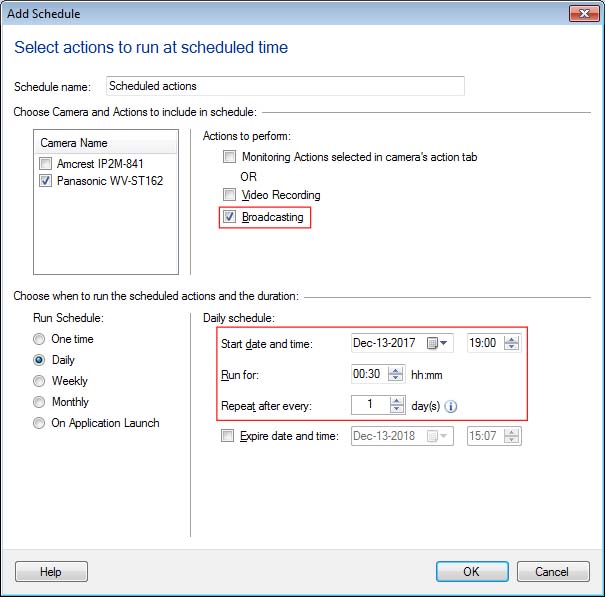
The broadcasting action will be started every day at 7PM and it will run for half an hour.
Hello! It looks like you're interested in this conversation, but you don't have an account yet.
Getting fed up of having to scroll through the same posts each visit? When you register for an account, you'll always come back to exactly where you were before, and choose to be notified of new replies (either via email, or push notification). You'll also be able to save bookmarks and upvote posts to show your appreciation to other community members.
With your input, this post could be even better 💗
Register Login