
Configure a separate proxy for each connection profile
-
I am using Auto FTP Manager for home use and it works perfectly. I want to recommend it for use at work, but we have a complicated network configuration with different network connections to reach each branch office. My question is, does Auto FTP Manager allow a different proxy setting for each connection profile?
-
Auto FTP Manager allows you to configure a proxy setting for each connection profile separately.
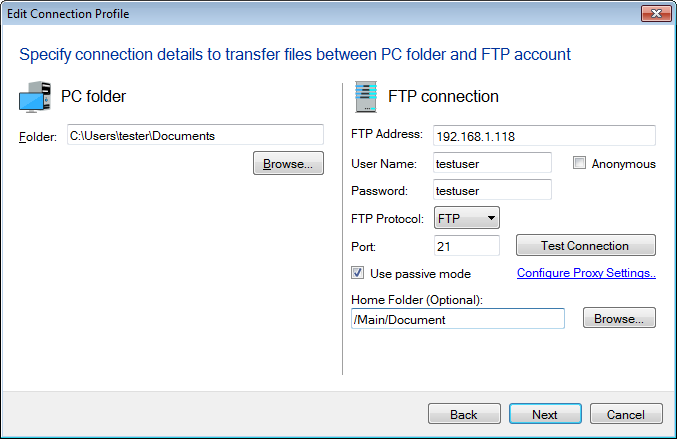
You can configure the proxy setting when creating a connection profile.
When creating a connection profile, click on the Configure Proxy Settings link.
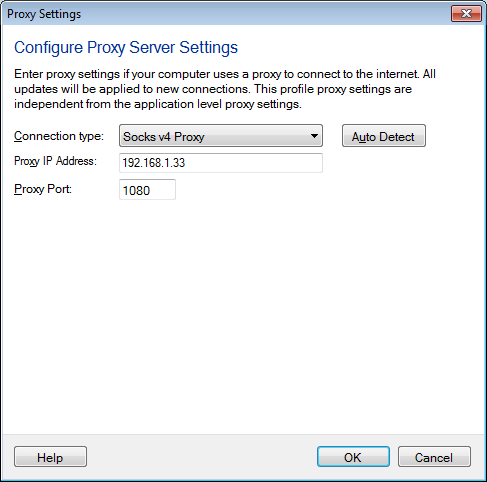
On the Proxy Settings dialog, choose the Connection Type from the drop down list. You can select the socks 4 & 5, HTTP, or FTP proxy connection as needed. Click on the Auto Detect button to detect the Proxy settings configured in Internet Explorer.
Hello! It looks like you're interested in this conversation, but you don't have an account yet.
Getting fed up of having to scroll through the same posts each visit? When you register for an account, you'll always come back to exactly where you were before, and choose to be notified of new replies (either via email, or push notification). You'll also be able to save bookmarks and upvote posts to show your appreciation to other community members.
With your input, this post could be even better 💗
Register Login