
Capture audio from the PC speakers during screen recording
-
I am watching a web video and I would like to record the video and particularly the song that is playing with the video. Can My Screen Recorder Pro record the audio along with the video?
-
My Screen Recorder Pro can record audio from the microphone, or the PC speakers or both at the same time.
You can easily configure My Screen Recorder Pro to capture the music or audio playing on the PC during screen recording. Just click on the Record icon from the tool bar. Select the Record system audio option and click the OK button to start recording.
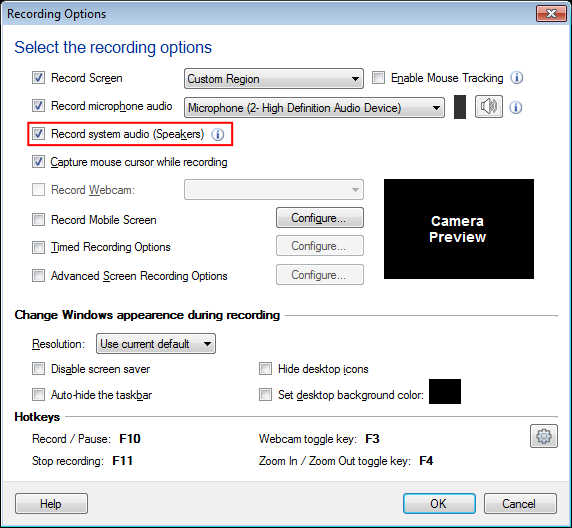
Every time you start screen recording, the audio from the music file or any video played on the computer will be recorded. You can uncheck the record audio option if you want to disable the audio capture from the speakers.
Note: Before starting the recording, make sure you have at least one playback device enabled. You should be able to hear the audio during recording.
Hello! It looks like you're interested in this conversation, but you don't have an account yet.
Getting fed up of having to scroll through the same posts each visit? When you register for an account, you'll always come back to exactly where you were before, and choose to be notified of new replies (either via email, or push notification). You'll also be able to save bookmarks and upvote posts to show your appreciation to other community members.
With your input, this post could be even better 💗
Register Login