
Fixing the inverted IP camera preview from camera mounted upside down
-
I have installed my IP camera upside down so I see everything inverted. Can I fix the inverted IP camera preview from Security Monitor Pro?
-
Security Monitor Pro allows you to rotate the camera preview. You can rotate the camera preview by 180 degrees and fix the inverted image problem.
To rotate the camera, right click on the camera preview and select the Edit camera option. Select ‘Rotate video by:’ option. By default it is set to 180 degrees. Click Ok to accept the settings.
The camera preview will be rotated by 180 degrees. Note that, all recorded videos and photos, are also rotated by the specified angle.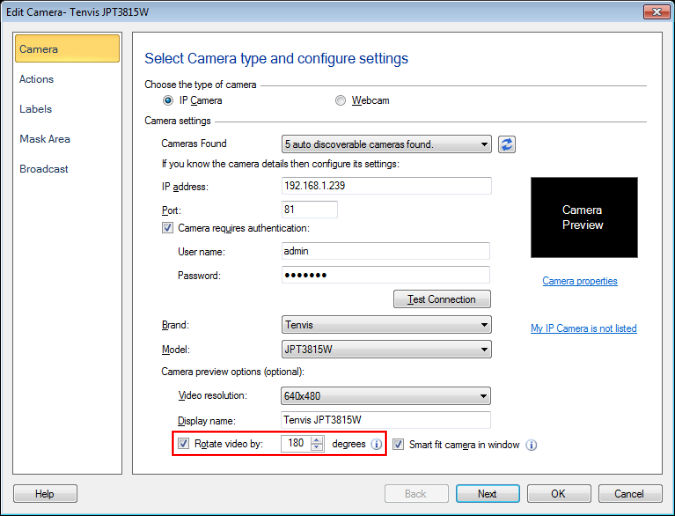
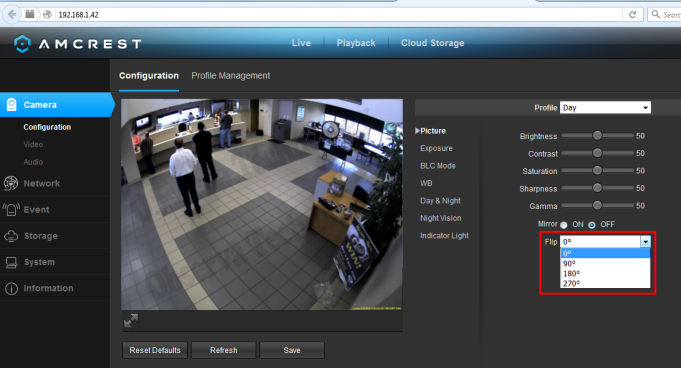
You can also fix this from the camera settings. Click on the Camera properties link shown on the Edit camera dialog. A camera preview web interface will be opened in the default web browser. Under the camera configuration section, you will see the option to rotate or flip the camera preview depending upon your IP camera brand and model.
Hello! It looks like you're interested in this conversation, but you don't have an account yet.
Getting fed up of having to scroll through the same posts each visit? When you register for an account, you'll always come back to exactly where you were before, and choose to be notified of new replies (either via email, or push notification). You'll also be able to save bookmarks and upvote posts to show your appreciation to other community members.
With your input, this post could be even better 💗
Register Login