
Add a number to image filenames during FTP upload
-
I use WebCam Monitor for uploading images captured from my USB cameras to an FTP server every hour. I want to know if I can add image numbers to the files while uploading those to the FTP server.
Thanks….. -
In WebCam Monitor you have some filename renaming options when saving your photo(s) to the FTP server.
To configure these settings, click on the Configure button for the Upload Media Files action from the Quick access panel. Go to the ‘Upload options’ section and select the Upload photos to my website option from the drop down list. Next, select Rename photo files check box and choose the ‘Append sequence number from 1 to 99’ option. Click Ok to save the settings.
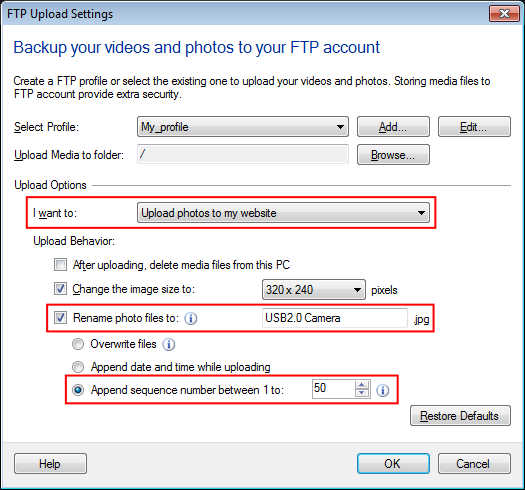
Whenever you perform a FTP upload, the images will be uploaded to the FTP server with a sequence number appended to the filename. This way you can have a collection of N most recent images.
Note: Once the counter reaches the selected value, it will be reset to 1 and starts from the beginning.
Hello! It looks like you're interested in this conversation, but you don't have an account yet.
Getting fed up of having to scroll through the same posts each visit? When you register for an account, you'll always come back to exactly where you were before, and choose to be notified of new replies (either via email, or push notification). You'll also be able to save bookmarks and upvote posts to show your appreciation to other community members.
With your input, this post could be even better 💗
Register Login