
Read medical instructions out loud daily with Text Speaker
-
I want to use Text Speaker to repeat a set of instructions out loud each day. This is for an elderly lady so she remembers to take her medicine and to change her bandages. Can you tell me how I can read these instructions out loud daily with Text Speaker?
-
Text Speaker can narrate instructions on a schedule using the Talking Reminders feature.
To configure the settings for a reminder, click on the Talking Reminders icon on the toolbar. Click on the Create button to configure a schedule for reading instructions. On the Reminder details dialog, specify a start date and time. Select the Repeat Every option and set it to ‘Repeat Every 1 day’. Enter the instructions in the text area that you want Text speaker to read. Click Ok to save your settings.
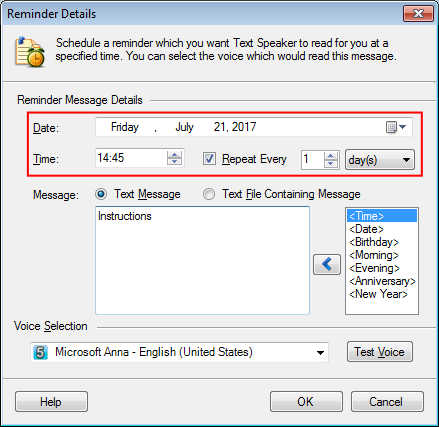
Now, Text Speaker will narrate instructions every day at a specified time. You can add multiple reminders to read different instructions.
Hello! It looks like you're interested in this conversation, but you don't have an account yet.
Getting fed up of having to scroll through the same posts each visit? When you register for an account, you'll always come back to exactly where you were before, and choose to be notified of new replies (either via email, or push notification). You'll also be able to save bookmarks and upvote posts to show your appreciation to other community members.
With your input, this post could be even better 💗
Register Login