
Reading special characters in Text Speaker
-
I have noticed that sometimes Text Speaker does not read some special characters. How to fix this? Any guidance would be appreciated.
-
Text Speaker allows you to set the pronunciation for words to make the perfect listening experience. You can read special characters by adding a pronunciation for them.
To add pronunciation, click on the Pronunciation icon from toolbar. Enter the character in the ‘Word’ text field and add the corresponding pronunciation. Click on the ‘Test’ button to check the pronunciation and finally click on ‘Apply’ button if it is correct.
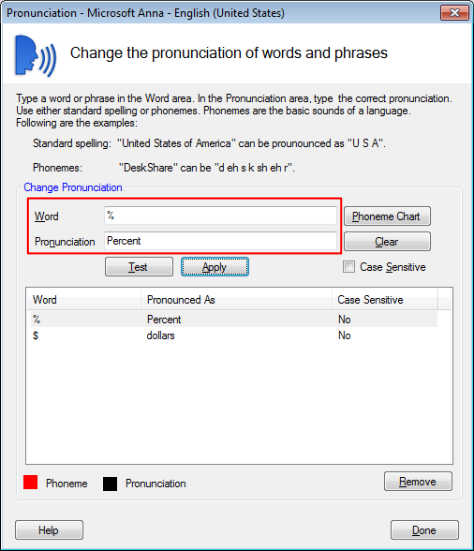
Now, Text speaker will read characters according to the applied pronunciation.
Hello! It looks like you're interested in this conversation, but you don't have an account yet.
Getting fed up of having to scroll through the same posts each visit? When you register for an account, you'll always come back to exactly where you were before, and choose to be notified of new replies (either via email, or push notification). You'll also be able to save bookmarks and upvote posts to show your appreciation to other community members.
With your input, this post could be even better 💗
Register Login