
Receiving an alert on a transfer failure
-
I want to use Auto FTP Manager for automating the file transfer. Is there any way to get a notification if there is a transfer failure?
-
Using Auto FTP Manager, you can receive notifications for all transfers or failed transfers. You can choose to save transfer report on PC or Network drive, FTP server or Email.
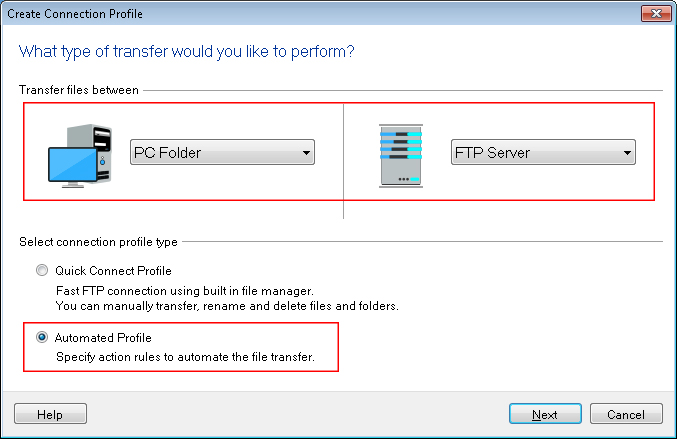
To receive an alert notifications, you have to create an automated transfer profile. Go to File >> New Connection Profile. Choose source and destination for transfer and select connection profile type as Automated Profile.
On the next page, provide FTP address, authentication details required to connect to the FTP server. On action rules page, select uploading or downloading action for file transfer. Under the ‘On completion of transfer’ section, select the Save or Send Transfer Report and click on Configure button. By default the ‘Save report when an automated transfer has failures’ option is selected. From ‘Save location’ drop down list, select the Email option. Enter the email address and the mail server details. Send test email to verify the email settings. Click OK to save these settings and create the profile.
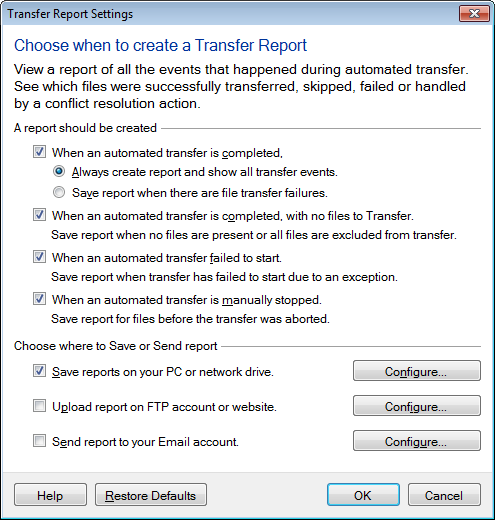
Whenever you start the automated transfer manually or on a schedule and transfer failure occurs, you will receive transfer report by an email.
Hello! It looks like you're interested in this conversation, but you don't have an account yet.
Getting fed up of having to scroll through the same posts each visit? When you register for an account, you'll always come back to exactly where you were before, and choose to be notified of new replies (either via email, or push notification). You'll also be able to save bookmarks and upvote posts to show your appreciation to other community members.
With your input, this post could be even better 💗
Register Login