
Start reading from the last read position in a long book
-
Can Text Speaker remember the paragraph where I stopped reading previously and start reading from there for next time? I am using it for reading a long book and this will be really helpful for me.
-
You can use the bookmark feature in Text Speaker to continue at the last read position.
Add a bookmark to return to any point in your document. When you stop reading the book, add a bookmark by right clicking and selecting the add bookmark option, then save your document.
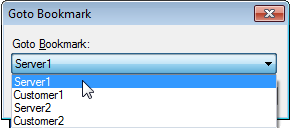
When you are ready to continue reading, open your book in Text Speaker. From the Edit menu, select the ‘Go to Bookmark’ option and choose the bookmark you have added. Finally, start reading from current cursor position using Speak menu.
Hello! It looks like you're interested in this conversation, but you don't have an account yet.
Getting fed up of having to scroll through the same posts each visit? When you register for an account, you'll always come back to exactly where you were before, and choose to be notified of new replies (either via email, or push notification). You'll also be able to save bookmarks and upvote posts to show your appreciation to other community members.
With your input, this post could be even better 💗
Register Login