
Taking photos from USB webcams at different times
-
I am using two webcams in WebCam Monitor. I want to take photos from both webcam at different times and duration. How to do this in WebCam Monitor?
-
This is an easy task with WebCam Monitor.
Add two separate schedules, one for each webcam.
On the add schedule dialog, select the first camera from ‘Camera Name’ list. Put the start date and time. Enter number of hours to run the schedule.
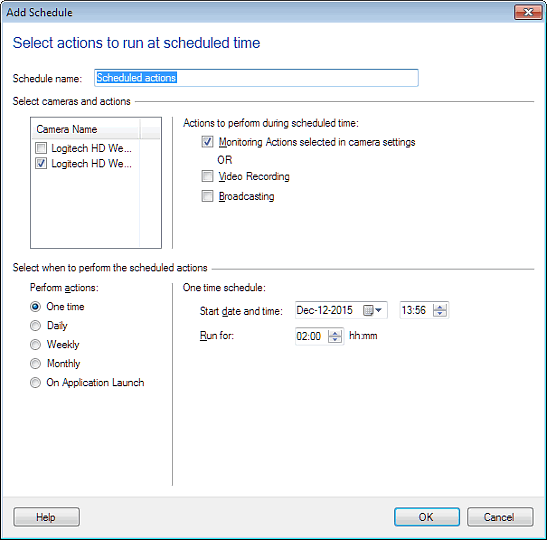
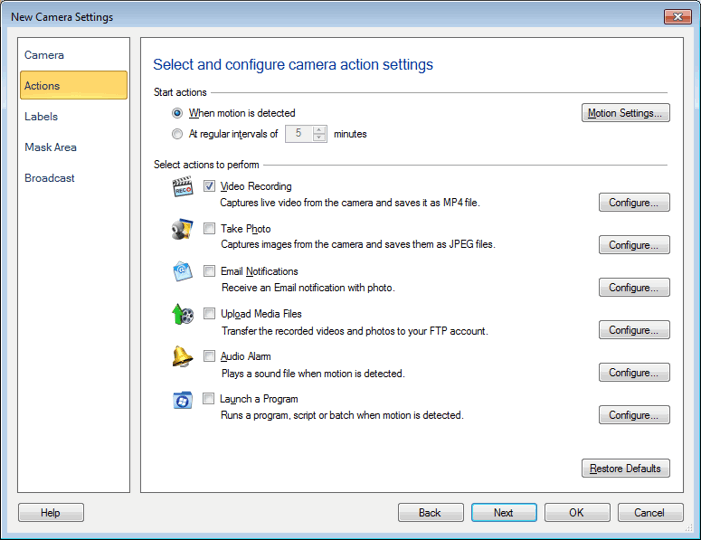
Similarly, add another schedule for the other camera. Make sure you have selected the ‘Take Photo’ action on actions tab.
Hello! It looks like you're interested in this conversation, but you don't have an account yet.
Getting fed up of having to scroll through the same posts each visit? When you register for an account, you'll always come back to exactly where you were before, and choose to be notified of new replies (either via email, or push notification). You'll also be able to save bookmarks and upvote posts to show your appreciation to other community members.
With your input, this post could be even better 💗
Register Login