
What do the color codes on the schedule window mean?
-
Security Monitor Pro is working great for me. I have set it to perform monitoring on a schedule, and I have added several schedules. I see there are some color changes for the schedules. What exactly these colors signify?
Thanks for your assistance.
-
Security Monitor Pro shows different color codes to indicate the status of the schedules.
There are four color codes used: Black, Green, Orange and Gray.
Black: Indicates a schedule is active and is waiting for its next run to execute or the schedule is completed.
[color=green]Green[/color]: Shows a schedule is currently running.
[color=orange]Orange[/color]: This color signifies that a schedule is expired and will not run again.
[color=olive]Grey[/color]: This color mark shows that a schedule is in disabled state.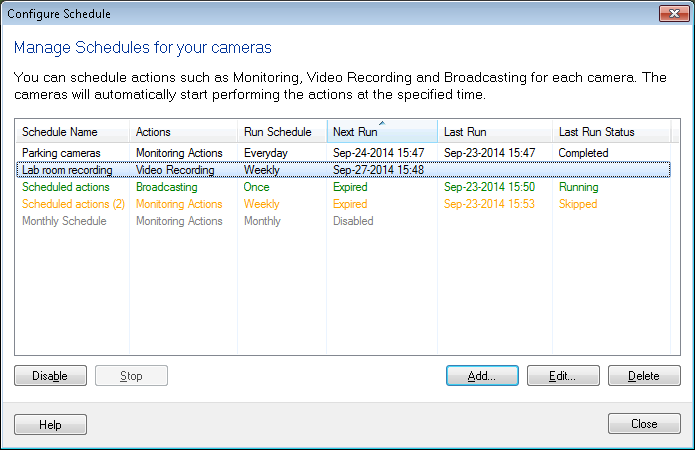
Hello! It looks like you're interested in this conversation, but you don't have an account yet.
Getting fed up of having to scroll through the same posts each visit? When you register for an account, you'll always come back to exactly where you were before, and choose to be notified of new replies (either via email, or push notification). You'll also be able to save bookmarks and upvote posts to show your appreciation to other community members.
With your input, this post could be even better 💗
Register Login