
Creating a .wav file using AT&T voices
-
I have a small amount of written text that I want to change into an audio file for a talking picture frame. The picture frame requires a wave file. I really like one of the AT&T voices you have. Can you tell me if I can create a wave file with the AT&T voice?
-
Text Speaker can easily create your .wav file. Just open the application, enter the text which you want to convert and save your text file. Go to the 'Speak' menu and select 'Convert Current File To Audio'. Select 'WAV' from 'Audio formats' drop down. Select the destination folder using 'Browse' button. Finally, click OK to convert your text file into a .wav file.
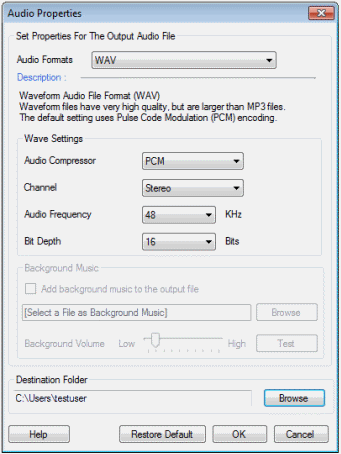
There are many different voices that will work with Text Speaker. Here is a list of voices you can use:
https://www.deskshare.com/text-to-speech-voices.aspx
Hello! It looks like you're interested in this conversation, but you don't have an account yet.
Getting fed up of having to scroll through the same posts each visit? When you register for an account, you'll always come back to exactly where you were before, and choose to be notified of new replies (either via email, or push notification). You'll also be able to save bookmarks and upvote posts to show your appreciation to other community members.
With your input, this post could be even better 💗
Register Login