
Synchronize project files using FTP
-
We have two teams working on the same project at different locations and we want to use a FTP client to synchronize our daily work. How to get this working using Auto FTP Manager?
-
You can use Auto FTP Manager to synchronize your files at your 2 locations.
Select the 'Synchronize' option from Transfer Rules tab.
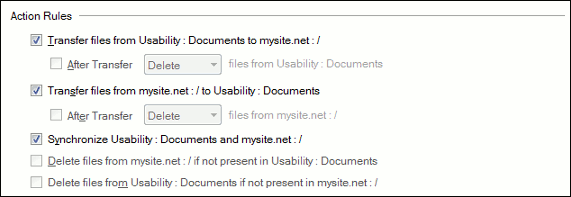
Set the Conflict Resolution to overwrite or skip.
You can also add a schedule to transfer the files hourly, or daily as required.
When the schedule runs, the latest files will be synchronized.
Hello! It looks like you're interested in this conversation, but you don't have an account yet.
Getting fed up of having to scroll through the same posts each visit? When you register for an account, you'll always come back to exactly where you were before, and choose to be notified of new replies (either via email, or push notification). You'll also be able to save bookmarks and upvote posts to show your appreciation to other community members.
With your input, this post could be even better 💗
Register Login