
Creating highlights or outlines in e-books
-
Hello!
I am a student and I am using the Text Speaker to read E-books. While reading the book I want to highlight some points. I would like to quickly review the points later on without having to listen to the entire document. How can I do this? -
You can create outlines using Text Speaker. While reading your file, you can mark important sections of your e-book for outlining. Later, you can have Text Speaker read aloud the marked areas, or convert the marked text into an audio file.
Select the text for audio outline and click Edit menu >> Outline Area. The outlined text is shown with a yellow background and is enclosed within the tags <OUTLINED> and </OUTLINED>.
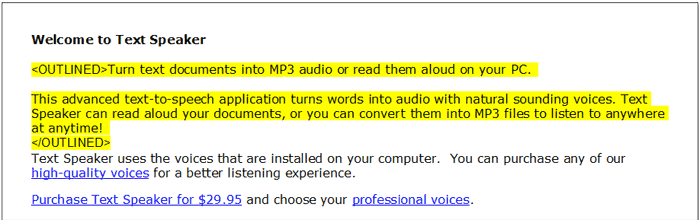
To listen to the marked text, click Speak menu >> Speak Outlined Text. Convert the marked text to an audio file by clicking Speak menu >> Convert Outlined Text and you will have a file of your key points you can listen to on your iPod.
Hello! It looks like you're interested in this conversation, but you don't have an account yet.
Getting fed up of having to scroll through the same posts each visit? When you register for an account, you'll always come back to exactly where you were before, and choose to be notified of new replies (either via email, or push notification). You'll also be able to save bookmarks and upvote posts to show your appreciation to other community members.
With your input, this post could be even better 💗
Register Login