
Creating natural sounding speech using multiple voices and emphasis
-
I am using Text Speaker to convert a document into a mp3 file. So far it is working well. I would like to make the mp3 sound more like natural speech by using different voices in the document. How can I do this?
-
Text Speaker allows you to have different voices read a document. Just select the part of the text you want in another voice, then go to the Edit menu and select 'Insert Voice Change'.
Here is an example: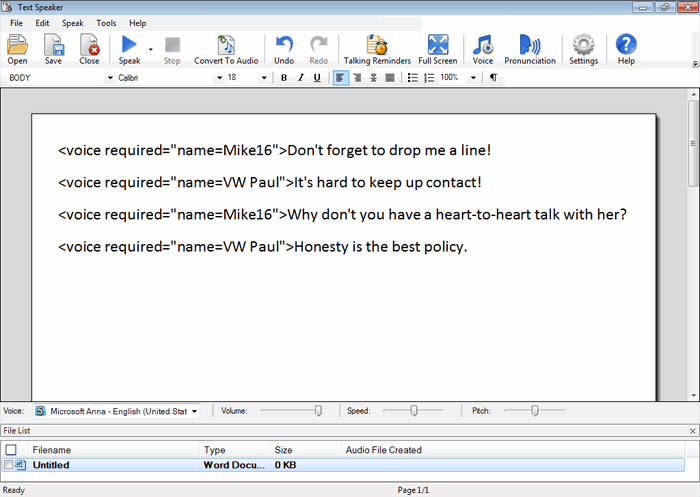
To make speech sound more natural, you can emphasize it correctly. Proper emphasis may also change the meaning of a sentence. To emphasize a word or a phrase in Text Speaker, select the text and click Edit >> Emphasize Selected word /Phrase.
Here is an example: Turn text documents into <emph>MP3 audio</emph> or read them aloud on your PC.
Hello! It looks like you're interested in this conversation, but you don't have an account yet.
Getting fed up of having to scroll through the same posts each visit? When you register for an account, you'll always come back to exactly where you were before, and choose to be notified of new replies (either via email, or push notification). You'll also be able to save bookmarks and upvote posts to show your appreciation to other community members.
With your input, this post could be even better 💗
Register Login