
Automatically changing the filename while downloading
-
I have been using Auto FTP Manager for years and I must say, you have a very good product. I have a question and I hope that you can help me with. Once I download a file from FTP to the local computer, is there a feature that will automatically rename the file?
For example, I have a recurring download, the file name is 1200.mp3 and a new version is created daily. After downloading, I would like it renamed so when I download it the next day, it will not overwrite yesterday's file.
Thank you for your time!
-
Auto FTP Manager can automatically rename the file so that you have a history of the older versions of your file using conflict resolution.
Here is how to turn this feature on: Edit your Automated Transfer profile and go to the Automated Transfer Settings tab. Under the Conflict Resolution section, look for the drop-down and select 'Appens Date-Time' option. If destination location contains a file with the same name then date and time will be appended.
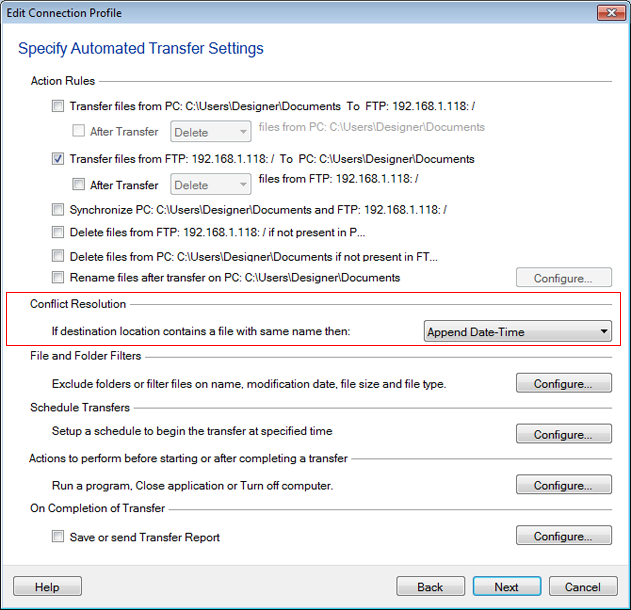
Each day when you download the file, it will be renamed as 1200-[current date].mp3.
Hello! It looks like you're interested in this conversation, but you don't have an account yet.
Getting fed up of having to scroll through the same posts each visit? When you register for an account, you'll always come back to exactly where you were before, and choose to be notified of new replies (either via email, or push notification). You'll also be able to save bookmarks and upvote posts to show your appreciation to other community members.
With your input, this post could be even better 💗
Register Login