
Starting FTP upload on motion detection
-
I like to buy the program, but I am having trouble getting the trial version working the way I want it.
I was able to see camera preview and used the instructions in the help file to let the camera take 15 pictures on motion detection, and perform an upload. But, the photos are not uploading to my website.
Do you have any tips to get this working?
-
There are couple of possibilities why the FTP upload is not occurring on your PC.
First, please check your FTP server settings. I would like you to test if you are connecting to your FTP account. For this, enter your IP address/domain name, username and password. Then click on 'Test FTP Connection' button. If the details are correct, connection will be successful.
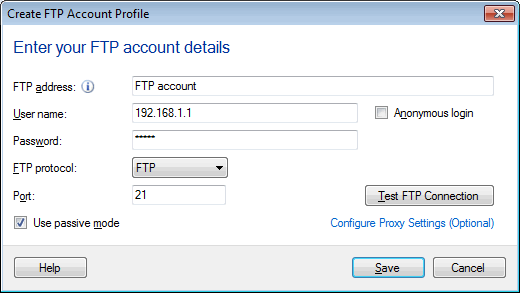
Next, make sure you have selected "Upload Photos to my Website" from FTP Upload settings.
To make this configuration follow the path: Go to Edit Camera>> Actions>> Configure Upload Media Files.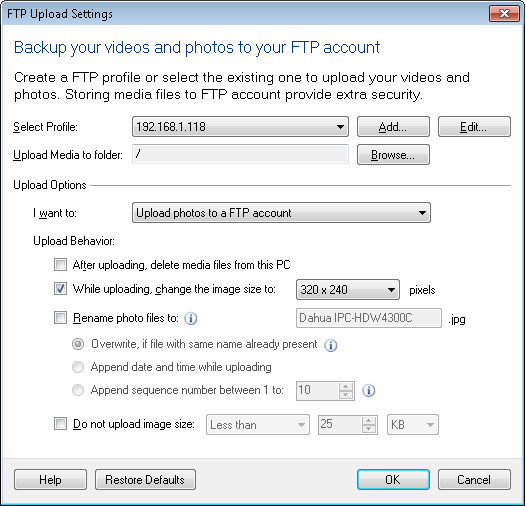
Now check that the FTP upload is enabled. From View Menu>> Upload Status.
You can enable or disable the FTP upload using "Disable/Enable" button.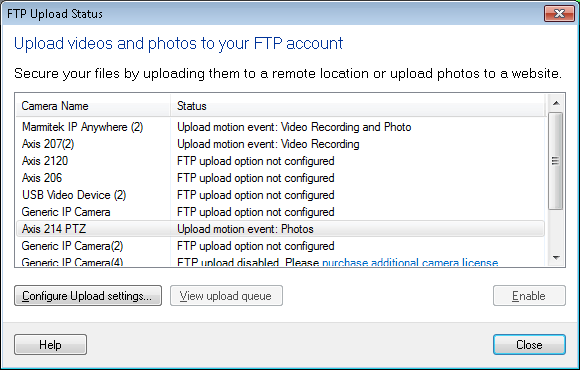
Finally, make sure you have started monitoring. Files will only be captured and uploaded when monitoring is turned on and motion is detected.
Hello! It looks like you're interested in this conversation, but you don't have an account yet.
Getting fed up of having to scroll through the same posts each visit? When you register for an account, you'll always come back to exactly where you were before, and choose to be notified of new replies (either via email, or push notification). You'll also be able to save bookmarks and upvote posts to show your appreciation to other community members.
With your input, this post could be even better 💗
Register Login