
Recording my Android device screen
-
Is it possible, using My Screen Recorder, to record my Android device screen?
-
My Screen Recorder allows you to record your Android device screen along with your PC screen.
Use the Screen Cast app on your Android device. This app allows you to view your mobile screen on the PC. You can use it to demonstrate a presentation, view photos and more.
Open the Screen Cast app, then select the connection method and click Start Broadcasting. You will see the login details to record your mobile screen.
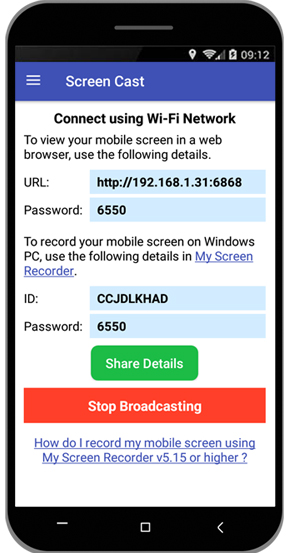
Next, open My Screen Recorder, click the ‘Record’ button on the toolbar. On the Recording Options dialog, select the option to Record mobile screen and enter the login details. Click Ok to save the settings. You will see your Android mobile screen on your PC. Once the changes are done, click Ok on ‘Recording Options’ dialog to start recording.
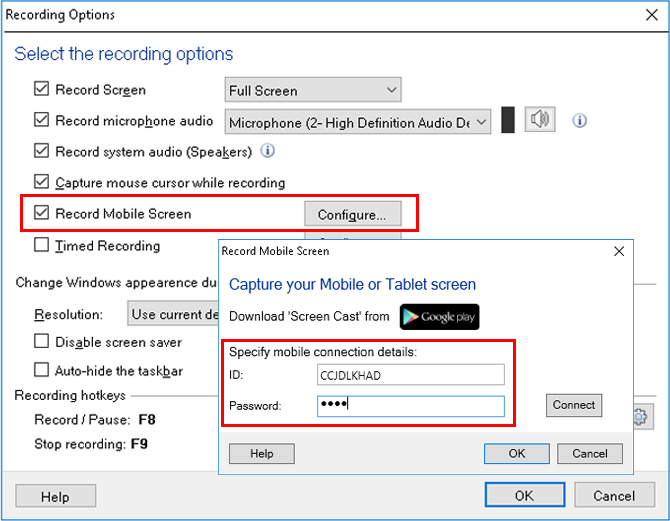
This will record your mobile screen along with the PC screen. Use keyboard shortcuts to hide or unhide the mobile screen window on your PC. You can also customize the size and position of the mobile screen window on your PC.
Hello! It looks like you're interested in this conversation, but you don't have an account yet.
Getting fed up of having to scroll through the same posts each visit? When you register for an account, you'll always come back to exactly where you were before, and choose to be notified of new replies (either via email, or push notification). You'll also be able to save bookmarks and upvote posts to show your appreciation to other community members.
With your input, this post could be even better 💗
Register Login