
Changing preview layouts and displaying a live camera on a full screen
-
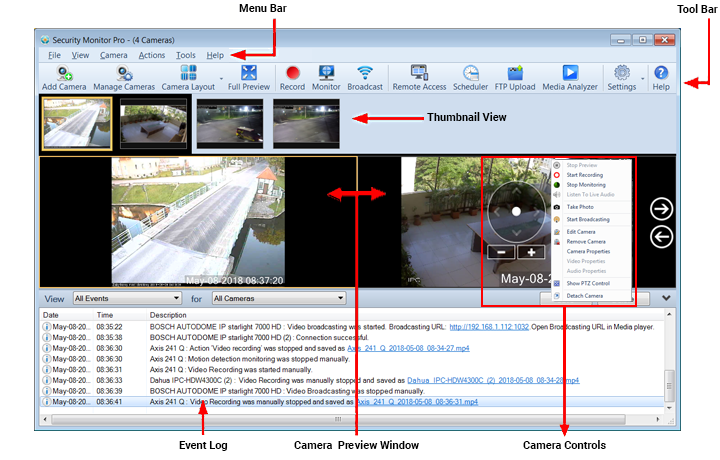
With regard to that your image:
https://www.deskshare.com/help/smp/User_Interface.png
I am using the program locally and in real time to monitor equipment operation. I am not looking for remote video surveillance, and would like to eliminate the "event log" to gain more space for the preview images.Is it possible on a system with 2 monitors that one of the cameras can be placed on the second monitor for a better view, leaving all the rest of the cameras on the first monitor? And using the full screen on the first monitor?
Sorry my English is not so good.
-
Security Monitor Pro has many display options.
You can minimize the log by click the double blue arrows in the top right of the log screen.
To have the maximum space, change the preview layout to a full screen. Select the layout you want, for example, with View >> Preview Layout >> 8 Cameras. Then click the Full Screen icon.
You can also detach the preview window to play on another monitor. Right click on a preview and select 'Detach'. Size and place this on any monitor you like.
Hello! It looks like you're interested in this conversation, but you don't have an account yet.
Getting fed up of having to scroll through the same posts each visit? When you register for an account, you'll always come back to exactly where you were before, and choose to be notified of new replies (either via email, or push notification). You'll also be able to save bookmarks and upvote posts to show your appreciation to other community members.
With your input, this post could be even better 💗
Register Login