
Make sure Android USB debugging is enabled
-
I am not able to figure out how to enable USB debugging on my android device.
Please explain how can I do that.
-
On Android 4.1 and lower, the Developer options screen is available by default, on Android 4.2 and higher, do the following:
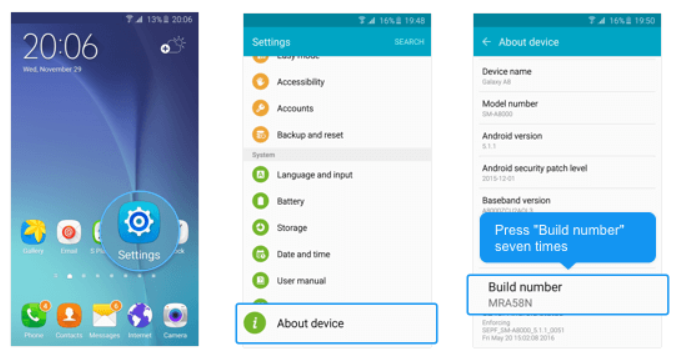
- Open the Settings app
- Scroll to the bottom and select About phone.
- Scroll to the bottom and tap Build number 7 times
[img=https://www.deskshare.com/forums/images/posts/MSRPpost3774-1.png]USB Debugging[/img]
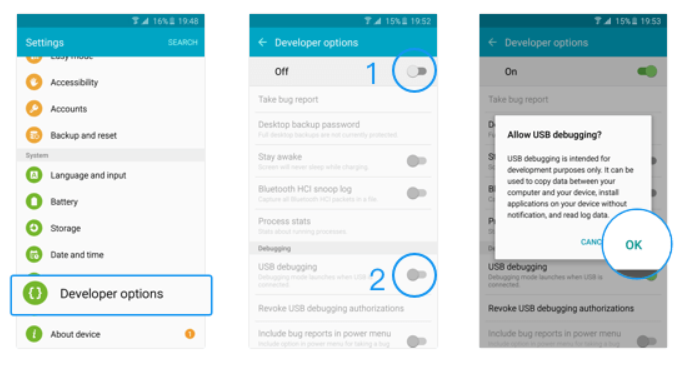
- Return to the previous screen to find Developer options, turn it ON
- Scroll down and enable USB debugging.
[img=https://www.deskshare.com/forums/images/posts/MSRPpost3744-2.png]USB Debugging[/img]
If USB debugging is already enabled and device is not connecting and not listed then:
- Open the Settings app
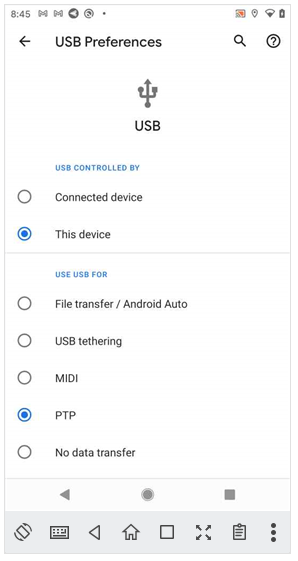
- Search for 'USB Preferences' option
- Set 'USE USB FOR' to 'PTP' as shown in this screenshot:
[img=https://www.deskshare.com/forums/images/posts/MSRPpost3744-3.png]USB Debugging[/img]
Hello! It looks like you're interested in this conversation, but you don't have an account yet.
Getting fed up of having to scroll through the same posts each visit? When you register for an account, you'll always come back to exactly where you were before, and choose to be notified of new replies (either via email, or push notification). You'll also be able to save bookmarks and upvote posts to show your appreciation to other community members.
With your input, this post could be even better 💗
Register Login