
Auto detecting the IP cameras on my local network
-
I have several new cameras connected to my office local network. Can Security Monitor Pro detect the cameras automatically?
-
Security Monitor Pro automatically detects all the ONVIF and UPnP cameras in your network. If your camera is ONVIF compatible, then the Brand and Model of the camera will be detected automatically. Most new cameras have ONVIF support.
To see a list of all the cameras detected by Security Monitor Pro, click the Add Camera button on the toolbar. On the New Camera Settings dialog, all auto-discoverable cameras will be listed in the Cameras Found dropdown list.
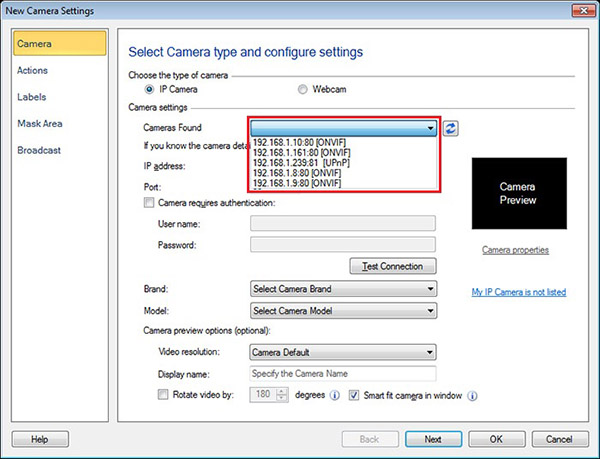
When the camera search is complete, select a camera from the list to add it to Security Monitor Pro.
If the camera is not listed, then it may not support ONVIF or UPnP. You can add the camera manually by selecting the camera brand and model from the list. If you don't find the camera in the list, then contact us to add support for your camera.
Hello! It looks like you're interested in this conversation, but you don't have an account yet.
Getting fed up of having to scroll through the same posts each visit? When you register for an account, you'll always come back to exactly where you were before, and choose to be notified of new replies (either via email, or push notification). You'll also be able to save bookmarks and upvote posts to show your appreciation to other community members.
With your input, this post could be even better 💗
Register Login