
Automatically transfer files less than 20 KB in size
-
Can I use your automatic ftp to transfer only files which are less than 10KB, or 20KB in size?
-
Auto FTP Manager can filter files based on the file size and then transfer the files which are smaller than the size you specify.
To do this, first create an automated transfer profile.
If you have already created the connection profile, right click on the profile name listed in the left side panel and select Edit Profile option. Move to the **Automated transfer settings **page. Click on the Configure button under the File and Folder Filters section.
Select the File Size filter type. Set it to Include the file size less than 20 KB and click the Ok button.
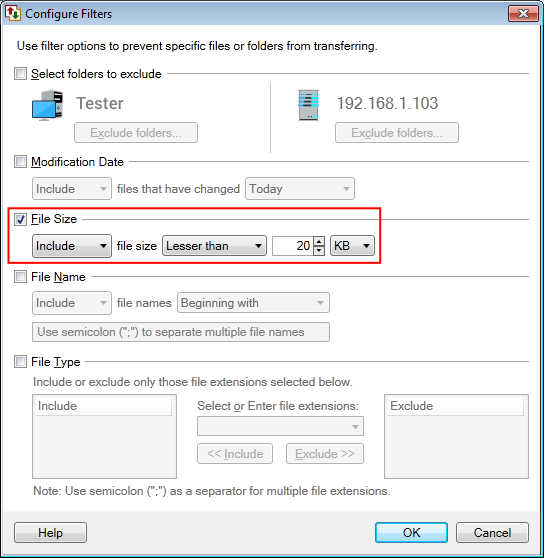
Whenever you start the automated transfer, the files under 20KB will be transferred and the other files will be ignored.
Hello! It looks like you're interested in this conversation, but you don't have an account yet.
Getting fed up of having to scroll through the same posts each visit? When you register for an account, you'll always come back to exactly where you were before, and choose to be notified of new replies (either via email, or push notification). You'll also be able to save bookmarks and upvote posts to show your appreciation to other community members.
With your input, this post could be even better 💗
Register Login