
Transfer files from the SD card in my phone to my PC
-
I want to transfer files from the SD card in my Samsung phone to my PC. Can you please give me detailed instructions on how can I do this?
-
Mobile to PC File Transfer gives you the ability to transfer files from any folder on your Android phone, including your SD card, to a Windows PC.
Mobile to PC File Transfer works with FTP Manager Lite.
Next, open Mobile to PC File Transfer on your Android phone, and go to settings and choose the **SD Card **option. Click on the SAVE button to save the settings. Now, note the ID and password to use in FTP Manager Lite on your Windows PC.
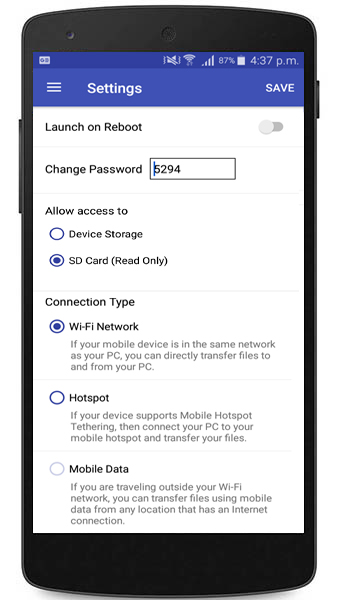
To control the transfer process, create a connection profile in the FTP Manager Lite.
Watch the video tutorial to see how to establish a connection: https://www.youtube.com/watch?v=GgOYdpmHq_U
First, open FTP Manager Lite on your Windows PC and click File >> New Connection Profile. Select Transfer files between a PC folder and a Mobile device. Navigate to next page and enter ID and password from your Android device in FTP Manager Lite. Then click on Test Connection to check whether the connection with your server is successful.
Once you have created the connection profile, you will see your SD card in File Manager. Select the files to transfer from your SD card to the PC folder.
Note:- If you are using Android version 5.0 or above then the SD card storage is Read Only. This means you cannot save files from your PC onto the SD card.
Hello! It looks like you're interested in this conversation, but you don't have an account yet.
Getting fed up of having to scroll through the same posts each visit? When you register for an account, you'll always come back to exactly where you were before, and choose to be notified of new replies (either via email, or push notification). You'll also be able to save bookmarks and upvote posts to show your appreciation to other community members.
With your input, this post could be even better 💗
Register Login