
Viewing the mobile device camera on my PC
-
I want to use IP Phone Camera for monitoring my parking area. I tried but the connection is not successful. Can you tell me in detail about how to establish a connection so I can view the mobile camera on my PC?
-
IP Phone Camera is designed to make it easy to view your mobile camera on your PC.
To establish the connection between your mobile and PC, please make sure both devices are on the same network.
To get started, open IP Phone Camera and press 'Start Broadcasting' on the home screen. You will see a URL on the top, note down the URL.
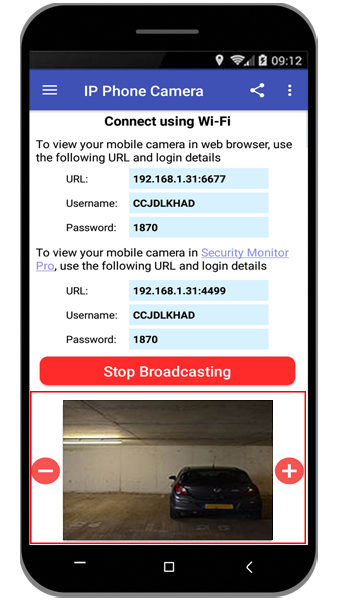
Next, open the web browser on your PC and enter the URL in the address bar.
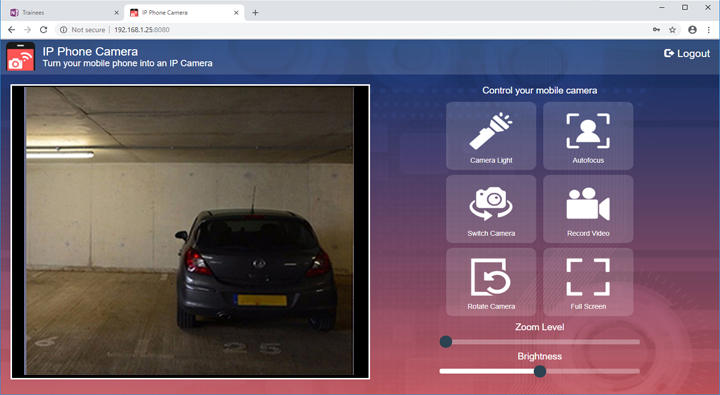
You should now be viewing live camera preview captured from your mobile on your PC's web browser. You can also use zoom in/zoom out, flashlight, switch camera, autofocus and full-screen features from your browser.
Hello! It looks like you're interested in this conversation, but you don't have an account yet.
Getting fed up of having to scroll through the same posts each visit? When you register for an account, you'll always come back to exactly where you were before, and choose to be notified of new replies (either via email, or push notification). You'll also be able to save bookmarks and upvote posts to show your appreciation to other community members.
With your input, this post could be even better 💗
Register Login