
Zoom in and zoom out during screen recording
-
Is it possible to zoom in and zoom out while recording the PC screen? This will help in focusing on a particular region of the screen as I record.
-
My Screen Recorder Pro supports zoom in and zoom out while recording the PC screen.
You have to use a keyboard shortcut key to enable the Zoom in/zoom out feature. You can set the key combination from the Settings >> Hotkeys.
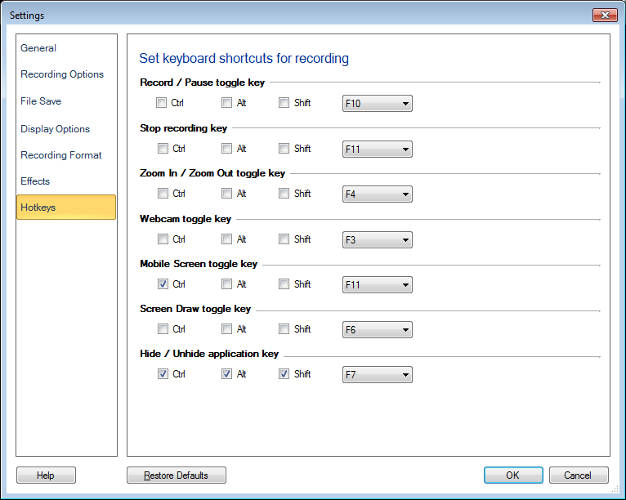
After setting the key combination, start screen recording by clicking on the Record icon from the toolbar. When the screen recording is ON, press the keyboard shortcut key to zoom in. A frame will appear on the screen, which indicates the zoom level and also the area getting recorded. This frame will follow the mouse pointer while recording the screen.
You can zoom out by using the same key combination. When you play the recorded file, you will see the zoom effect.
Hello! It looks like you're interested in this conversation, but you don't have an account yet.
Getting fed up of having to scroll through the same posts each visit? When you register for an account, you'll always come back to exactly where you were before, and choose to be notified of new replies (either via email, or push notification). You'll also be able to save bookmarks and upvote posts to show your appreciation to other community members.
With your input, this post could be even better 💗
Register Login