
Adjusting word pronunciation in Text Speaker
-
I am a new user and testing the trial version of Text Speaker. It is not correctly pronouncing some words in my document. How to fix the pronunciation?
-
You can change the way Text Speaker pronounces a word when you listen to your document.
To change the pronunciation for any word, select it and click Tools >> Pronunciation. Enter the word you want to correct the pronunciation for in the Word text field. Enter the way you want the word to be pronounced in the Pronunciation text field. Click the Test button to hear the pronunciation and click Apply if it is correct.
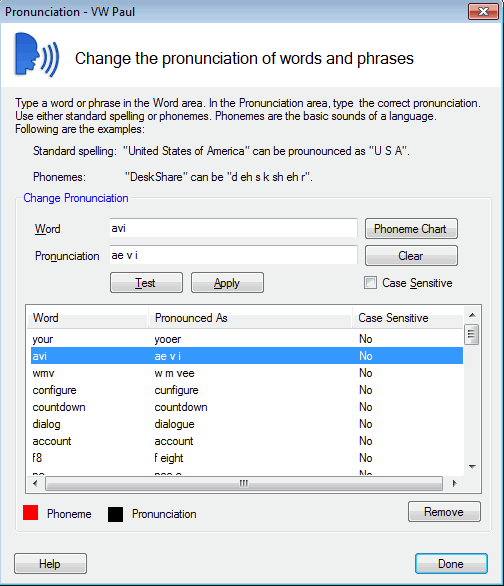
Use this method in Text Speaker to correct the pronunciation for each incorrectly pronounced word in your document.
To learn more about Adjusting Pronunciation see this link:
https://deskshare.com/help/ts/AdjustingPronunciation.aspx
Hello! It looks like you're interested in this conversation, but you don't have an account yet.
Getting fed up of having to scroll through the same posts each visit? When you register for an account, you'll always come back to exactly where you were before, and choose to be notified of new replies (either via email, or push notification). You'll also be able to save bookmarks and upvote posts to show your appreciation to other community members.
With your input, this post could be even better 💗
Register Login