
Maintaining the connection to a busy FTP server
-
I want to use Auto FTP Manager for file transfer. The FTP server to which I want to connect is very busy and requires many attempts to make a connection. Is there any way I can make multiple attempts to connect to the FTP server and maintain the connection?
-
Auto FTP Manager allows you to set the number of attempts for login to a FTP server. This retry setting is helpful when you are connecting to a busy FTP server.
To set retry login attempts, go to File >> Settings. On the Connection tab, look for the On Connection Failure section. Increase the Retry login attempts and set a delay between each retry attempt before aborting. Auto FTP Manager will try to login to the FTP server for the number of times you specify.
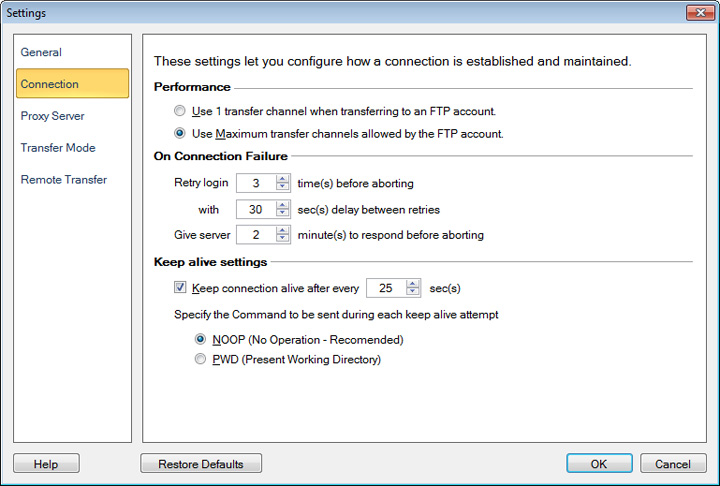
The Keep alive settings in Auto FTP Manager are useful to maintain a connection with the FTP server. It prevents disconnection by regularly sending a command that does not do anything.
Note: Some FTP servers do not support the NOOP command and can disconnect even after receiving the NOOP command regularly. For such FTP servers, it is recommended to use the PWD command to keep the connection alive.
Hello! It looks like you're interested in this conversation, but you don't have an account yet.
Getting fed up of having to scroll through the same posts each visit? When you register for an account, you'll always come back to exactly where you were before, and choose to be notified of new replies (either via email, or push notification). You'll also be able to save bookmarks and upvote posts to show your appreciation to other community members.
With your input, this post could be even better 💗
Register Login