
Prevent anyone from changing Security Monitor Pro settings
-
I have set up Security Monitor Pro on a PC in my shop to monitor and record. There are other employees working in my shop near my PC. So, I don’t want them to make any changes to the application settings. Can I prevent other users from making any changes?
-
You can prevent anyone from changing the application settings in Security Monitor Pro by setting a password to lock your settings.
To set the password, click the Settings icon on the tool bar. On the Security tab, click on the Set Password button, then enter and confirm the password. After setting the password, select the check box to lock the application and click the **OK **button. Your settings are now locked.
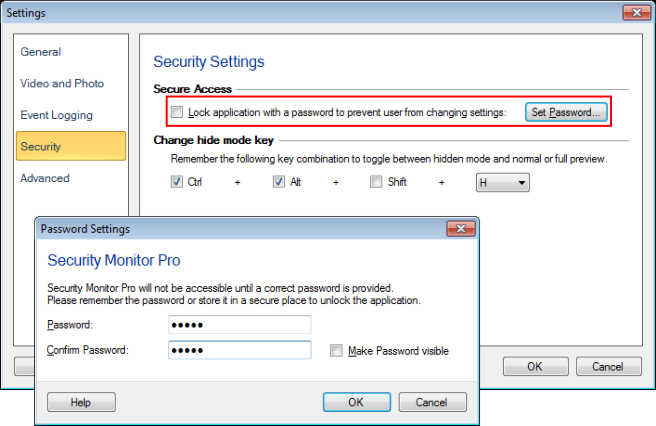
Anyone can see the camera preview, but cannot make any changes to the application settings.
Note: The password should be at least 4 characters long. You should remember the password to unlock and access the application settings.
Hello! It looks like you're interested in this conversation, but you don't have an account yet.
Getting fed up of having to scroll through the same posts each visit? When you register for an account, you'll always come back to exactly where you were before, and choose to be notified of new replies (either via email, or push notification). You'll also be able to save bookmarks and upvote posts to show your appreciation to other community members.
With your input, this post could be even better 💗
Register Login