
Quickly updating a menu for restaurant telephone answering system
-
I am a owner of a restaurant and using Text Speaker to create an audio file to use on my telephone answering system. Mostly the introductory part is the same but I have to change the specials for the day along with prices. Right now, I manually go through the text file to find the content to be updated. Is it possible to quickly move to the section of text file where I want to make my changes?
-
Text Speaker allows you to set bookmarks within your document for easy reference. With bookmarks you can quickly return to the section of your document at any time.
Go to the section in the document where you have a menu list and click Edit >> Add Bookmark. Give a name to the bookmark. You can add multiple bookmarks to your document and return to it.
Now, whenever you want to do changes in menu list, click Edit >> Go to Bookmark and choose a bookmark from the dropdown.
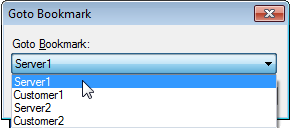
This way, you can easily move to the point where you want to do changes.
Hello! It looks like you're interested in this conversation, but you don't have an account yet.
Getting fed up of having to scroll through the same posts each visit? When you register for an account, you'll always come back to exactly where you were before, and choose to be notified of new replies (either via email, or push notification). You'll also be able to save bookmarks and upvote posts to show your appreciation to other community members.
With your input, this post could be even better 💗
Register Login