
Creating password protected video screen recordings
-
I want to use My Screen Recorder Pro to create some confidential videos which I have to share with partners and clients. Is there any way to make the videos more secure and easily playable on any computer?
-
You can create a password protected video executable file in My Screen Recorder Pro. This exe file can be shared with clients, partners and only those who have the correct password can view the file.
A video executable allows you to make your media files playable on a PC, without any requirement of an exclusive media player.
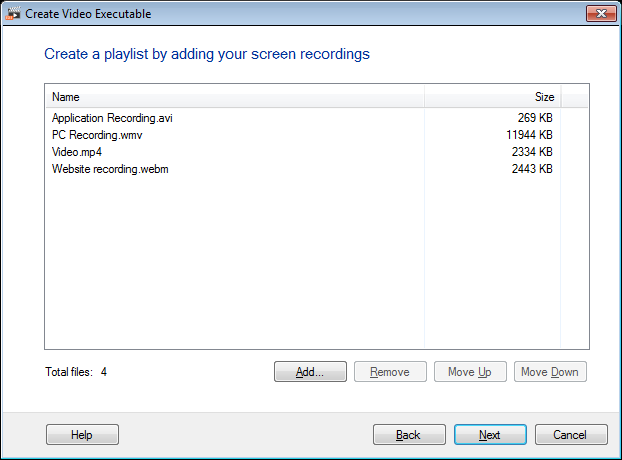
Create your screen recordings, then from the tool bar click on 'Video Executable'. Add all the files for which you want to create a video executable file.
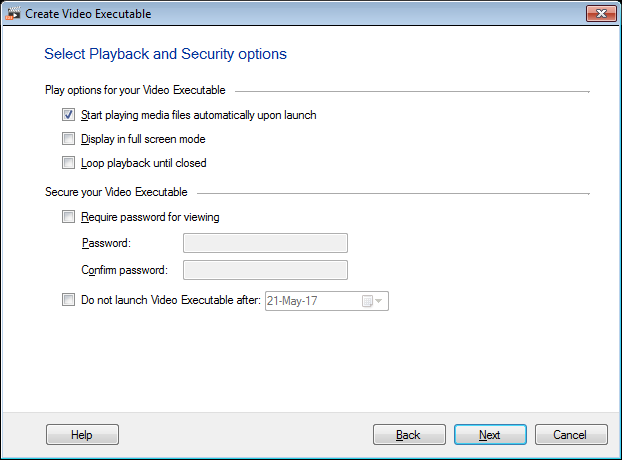
In next step, check the box 'Require password for viewing' and enter the password of your choice with at least 4 characters.
Hello! It looks like you're interested in this conversation, but you don't have an account yet.
Getting fed up of having to scroll through the same posts each visit? When you register for an account, you'll always come back to exactly where you were before, and choose to be notified of new replies (either via email, or push notification). You'll also be able to save bookmarks and upvote posts to show your appreciation to other community members.
With your input, this post could be even better 💗
Register Login