
Closing the background process of Auto FTP Manager
-
I am trying Auto FTP Manager but I am having a difficulty when I think I am closing the application. It is getting closed from the screen, but it is still running in the background. I can see it in the notification tray. I have to remove it from tray as well by right clicking and choosing exit. How to avoid this and close it just once?
-
Running in the background is the default setting in Auto FTP Manager.
To change the settings, click File >> Settings >> General, and you will see the following dialog. Under 'General Options', uncheck the option 'On Application close minimize Auto FTP Manager to system tray', click OK and save the settings.
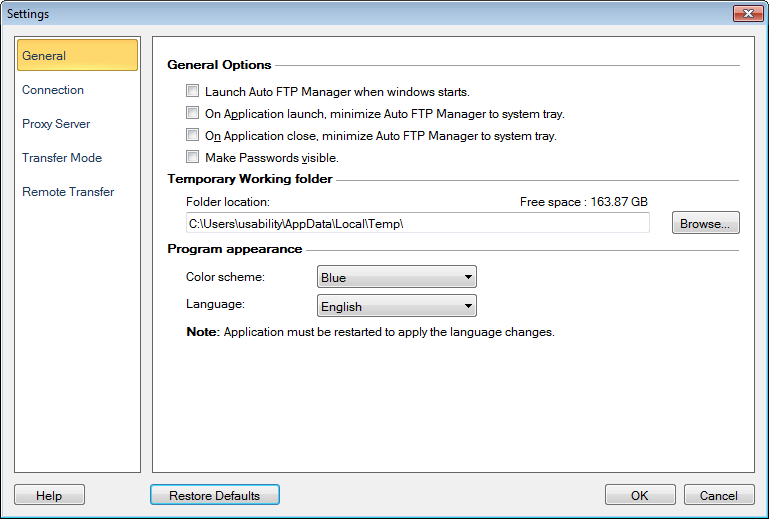
Next time when you close the application it will directly get closed.
Hello! It looks like you're interested in this conversation, but you don't have an account yet.
Getting fed up of having to scroll through the same posts each visit? When you register for an account, you'll always come back to exactly where you were before, and choose to be notified of new replies (either via email, or push notification). You'll also be able to save bookmarks and upvote posts to show your appreciation to other community members.
With your input, this post could be even better 💗
Register Login