
Highlighting the mouse on the screen while recording
-
I have a lot of detail on my screen and sometime my mouse is difficult to see. I want to highlight the mouse while recording the screen. I appreciate if you can provide directions to do this.
-
You can add different mouse effects in My Screen Recorder Pro.
To change the appearance of the mouse pointer in your recording, click **Effects **menu >> Mouse Pointer Image. Change the system mouse pointer or choose a mouse pointer from the provided dropdown list. You can opt to use a custom pointer by specifying the path of the cursor file.
Use mouse pointer effects for Highlighting Mouse Movements and Mouse Clicks which easily draws the attention of your audience when pointing at certain elements. It is an effective way of making sure that your cursor never gets lost in the background.
To highlight the position of the mouse in your recordings, select the option Highlighting mouse movements.
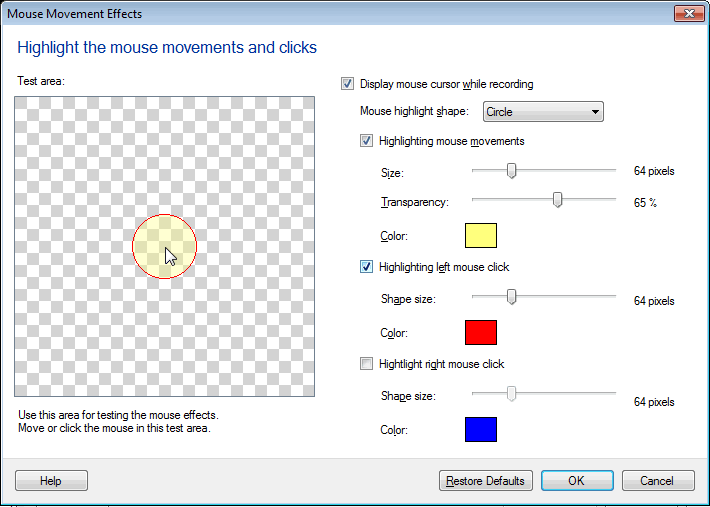
Choose a shape from the Mouse highlight shape dropdown list. Optionally change the size and color of the selected shape and also set the transparency value of the color using the slider.
Hello! It looks like you're interested in this conversation, but you don't have an account yet.
Getting fed up of having to scroll through the same posts each visit? When you register for an account, you'll always come back to exactly where you were before, and choose to be notified of new replies (either via email, or push notification). You'll also be able to save bookmarks and upvote posts to show your appreciation to other community members.
With your input, this post could be even better 💗
Register Login