
Upload a file only once during a automated transfer
-
Hi,
New files should be uploaded only once.
If the files are deleted on the FTP server, the files should not be re-uploaded. The main problem is that the file will be filterd and moved to a specific directory on the ftp Server. Therefore the file seems to be deleted from the upload directory. The result is that the file will be uploaded again and again.is it possible to upload only once?
-
Yes, Auto FTP Manager provides filter options so you can achieve the transfer results you are looking for.
Edit your automated profile and select the Transfer Rules tab. Click on the Filter Options button and check the Modification Date box. Set to Include files that were modified Today. Here is an illustration:
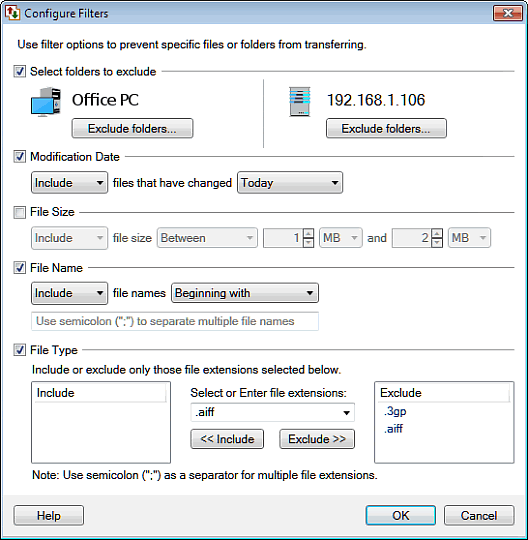
Execute your schedule at the end of the business day and the files will be transferred only once.
Hello! It looks like you're interested in this conversation, but you don't have an account yet.
Getting fed up of having to scroll through the same posts each visit? When you register for an account, you'll always come back to exactly where you were before, and choose to be notified of new replies (either via email, or push notification). You'll also be able to save bookmarks and upvote posts to show your appreciation to other community members.
With your input, this post could be even better 💗
Register Login