
Watch a PC folder for new files to upload
-
I want to use Auto FTP Manager for automatic file upload. I have a question - Is there any way to start the file upload process when I add new files in a PC folder?
-
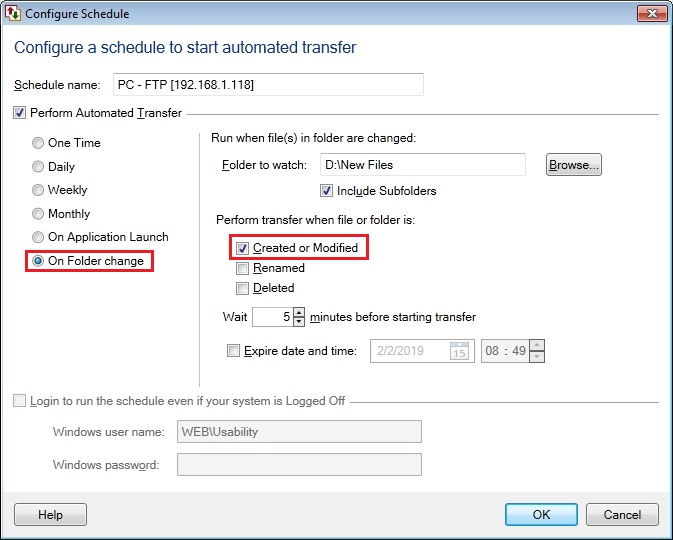
Auto FTP Manager can watch a folder for new files. When new files are added in a PC folder, an automatic upload can be performed. The folder can be monitored for file creation, modification, rename and deletion.
Lets assume you have a connection profile created. If you have not created a connection profile then refer the help file to see how to create an automated transfer profile.
Now, you have to create a schedule. On Create Connection Profile dialog, go to Schedule Transfers section and click Configure. Then choose the On Folder Change schedule option and select the folder which you want to monitor for changes when new file is Created or Modified. You can also add a wait time after a file change is made with the help of Wait N minutes before starting transfer option.
Hello! It looks like you're interested in this conversation, but you don't have an account yet.
Getting fed up of having to scroll through the same posts each visit? When you register for an account, you'll always come back to exactly where you were before, and choose to be notified of new replies (either via email, or push notification). You'll also be able to save bookmarks and upvote posts to show your appreciation to other community members.
With your input, this post could be even better 💗
Register Login