
Send an email after every hour using WebCam Monitor
-
I have added three USB cameras in WebCam Monitor. I want to send an e-mail from all the webcams regularly after every one hour. How do I do this?
-
WebCam Monitor allows you to perform a repetitive action, such as sending an email every hour, by using the regular interval monitoring action.
To set this up, go to the Quick Access panel and select Regular intervals of ‘N’ minutes option. Set the interval value to 60 minutes and choose the Email Notifications action. Enter the email address, authentication and the other mail server details. Click the Ok button to save these settings.
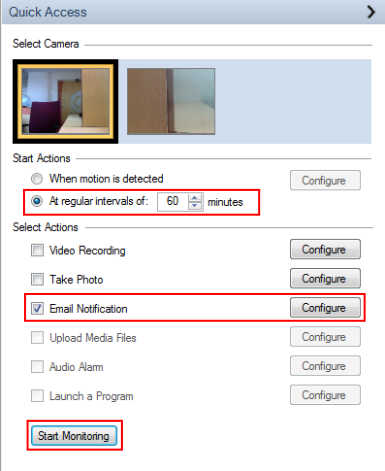
Repeat these steps for each webcam. After configuring all webcams, click the Start Monitoring button from the Quick access panel. An email with a picture will be sent each hour from your 3 webcams.
Hello! It looks like you're interested in this conversation, but you don't have an account yet.
Getting fed up of having to scroll through the same posts each visit? When you register for an account, you'll always come back to exactly where you were before, and choose to be notified of new replies (either via email, or push notification). You'll also be able to save bookmarks and upvote posts to show your appreciation to other community members.
With your input, this post could be even better 💗
Register Login