
Searching through older screen recordings
-
I would like to refer to older recordings, but they are sometimes difficult to find as I have a large number of files. Is there any way to quickly search through screen recordings?
-
My Screen Recorder Pro allows you to quickly search screen recordings within a folder.
To search for a screen recording in a folder, go to File >> Search. Select the folder to search for your media files. You can enter a few characters of file name to begin searching. You can also check the Date option and find older files which are Created or Modified On / Before / After the selected date.
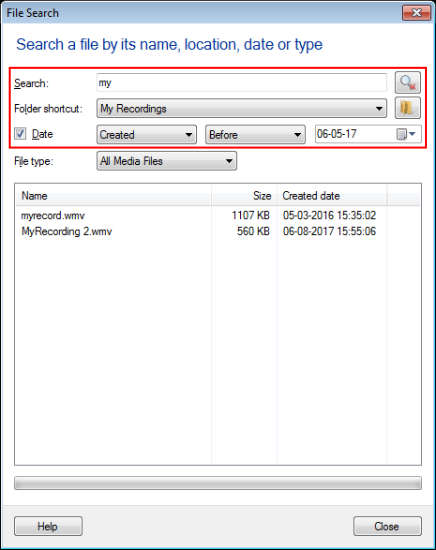
You can also select the File Type as Video file / Audio file to make the searching process faster. If the file is present, it will be shown in the search result. When you double click on a file name, it will be highlighted in the list on the main user interface.
The search feature allows you to quickly search your media files based on file name, date and file type.
Hello! It looks like you're interested in this conversation, but you don't have an account yet.
Getting fed up of having to scroll through the same posts each visit? When you register for an account, you'll always come back to exactly where you were before, and choose to be notified of new replies (either via email, or push notification). You'll also be able to save bookmarks and upvote posts to show your appreciation to other community members.
With your input, this post could be even better 💗
Register Login