
Keeping a history of file updates
-
When I download files from my FTP server, the existing files on my local PC are overwritten. Is it possible to keep my original file and maintain a history of the file changes/updates?
-
In Auto FTP Manager the default rule is to overwrite files if they are present on the destination. You can maintain a history of file changes by appending the date and time to newer files. This can be done using the Conflict resolution feature.
To configure these settings, right click on the automated transfer profile name and select the Edit Profile option. Navigate to the Action rules page. Look for the Conflict resolution section, and choose the Append Date-Time option from the drop down list.
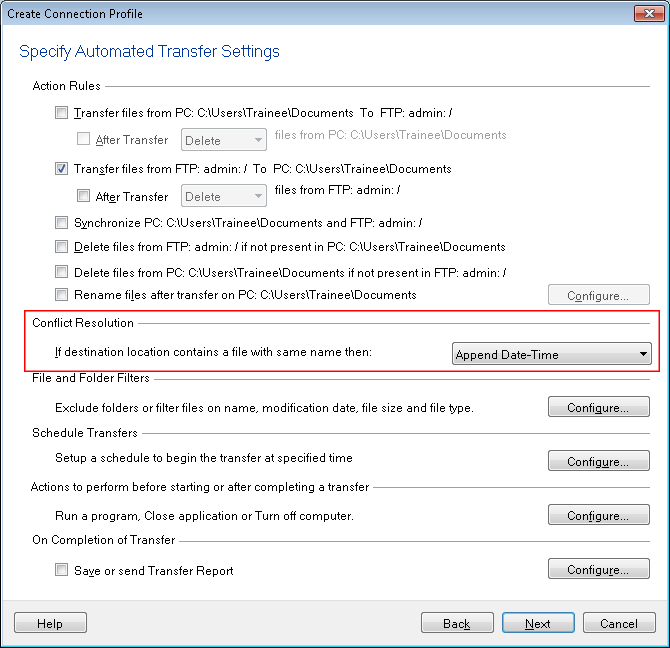
Now, whenever you download files from your FTP server, the date and time will be added to the filename. This way the original file will not get overwritten and you can maintain a history of downloaded files.
Hello! It looks like you're interested in this conversation, but you don't have an account yet.
Getting fed up of having to scroll through the same posts each visit? When you register for an account, you'll always come back to exactly where you were before, and choose to be notified of new replies (either via email, or push notification). You'll also be able to save bookmarks and upvote posts to show your appreciation to other community members.
With your input, this post could be even better 💗
Register Login