
Efficiently using Security Monitor Pro with higher number of cameras
-
I have 10 cameras added in Security Monitor Pro out of which 5 are high resolution cameras. I found that it takes a lot of system resources. Is there any way or settings to reduce system load and work efficiently with Security Monitor Pro?
-
With Security Monitor Pro, you can simultaneously view and control multiple cameras. Adding high resolution cameras can take more system resources.
If you have high end machine and still facing problem then you can try following steps to reduce the system load.
1.Avoid adding image/text labels and rotation on camera preview.
2.In Video resolution option, select ‘Camera Default’. For each high resolution camera, right click on the camera preview, select Edit Camera option and change the Video resolution in Camera Default.
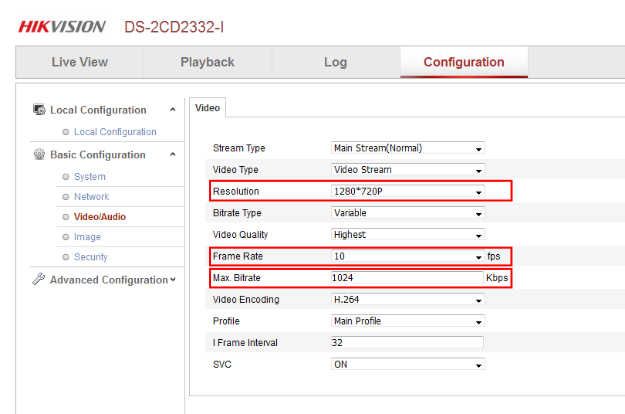
Now, click on Camera Properties link present below the camera preview. This will open the camera web interface in default browser. Reduce the frame rate and video resolution on your camera’s web interface.
3.For RTSP cameras, reduce the bitrate value to less than or equal to 1 mbps.
Hello! It looks like you're interested in this conversation, but you don't have an account yet.
Getting fed up of having to scroll through the same posts each visit? When you register for an account, you'll always come back to exactly where you were before, and choose to be notified of new replies (either via email, or push notification). You'll also be able to save bookmarks and upvote posts to show your appreciation to other community members.
With your input, this post could be even better 💗
Register Login