
Searching for screen recordings
-
I create lots of screen recordings every day. Because there are so many files, I find it difficult to search some of my previous recordings. Is there anything that can help me to find the file I am looking for?
-
You can use the File Search function in My Screen Recorder Pro to find your files.
Here is how:
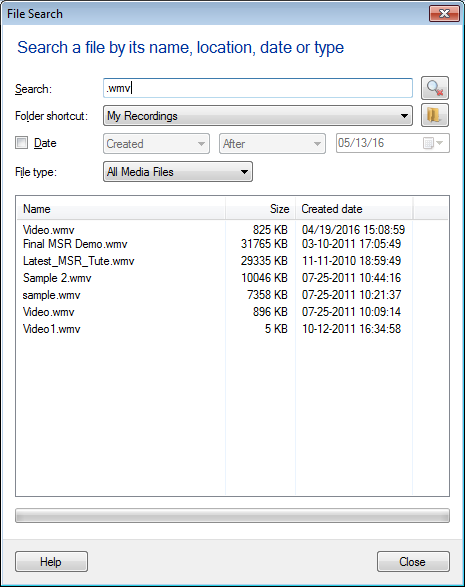
- From File menu >> Click on the 'Search...' option. You will see following dialog:
-
Enter a few characters of the filename to begin the search. Make your searching process faster by entering Date and File Type.
-
If the file is present, it is shown in the search results. Now double click on the file to open it.
Hello! It looks like you're interested in this conversation, but you don't have an account yet.
Getting fed up of having to scroll through the same posts each visit? When you register for an account, you'll always come back to exactly where you were before, and choose to be notified of new replies (either via email, or push notification). You'll also be able to save bookmarks and upvote posts to show your appreciation to other community members.
With your input, this post could be even better 💗
Register Login