
Is there an option to limit the number of frames per second?
-
How can I put the limit on number of frames per second? I don't see any option, I appreciate any help you can provide.
-
Yes, you can change the frame rate in My Screen Recorder Pro.
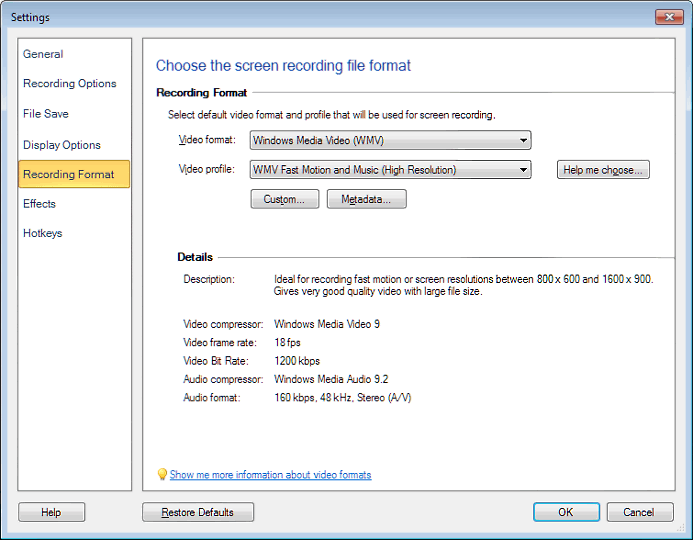
You can choose the frames per second when using a custom profile.
Here are the steps to set a custom frame rate:
- From the Tool bar, select Settings >> Recording Format. Then click on the Custom... button.
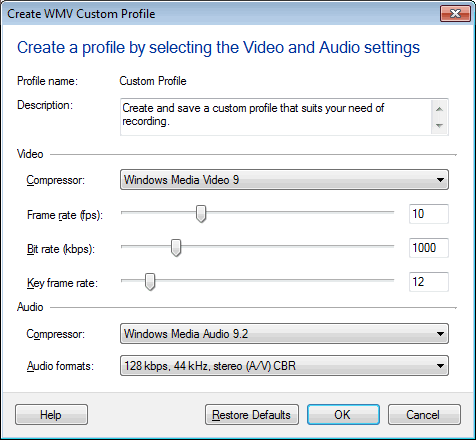
- Adjust the frame rate to the value you would like, and click OK.
For most screen-capture applications, a frame rate between 5 and 10 fps is adequate. If you are recording fast motion or video playback, the quality can be improved by increasing the frame-rate value.
Hello! It looks like you're interested in this conversation, but you don't have an account yet.
Getting fed up of having to scroll through the same posts each visit? When you register for an account, you'll always come back to exactly where you were before, and choose to be notified of new replies (either via email, or push notification). You'll also be able to save bookmarks and upvote posts to show your appreciation to other community members.
With your input, this post could be even better 💗
Register Login